Find answers, learn keyboard shortcuts, and troubleshoot common issues with VLC.
Answers to the most common questions about VLC media player.
Yes, VLC media player is completely free and open-source. It is distributed under the GNU General Public License (GPL). There are no hidden costs, subscription fees, advertisements, or user tracking of any kind. The project is maintained by the VideoLAN non-profit organization and funded through donations.
VLC supports virtually every audio and video format available. This includes MP4, MKV, AVI, MOV, FLV, WebM, MP3, FLAC, AAC, OGG, WAV, H.264, H.265, VP9, AV1, and many more. It can also play DVDs, Blu-rays, Audio CDs, and network streams. No additional codec packs are needed.
Yes, VLC 3.0.23 fully supports Windows 11 in both 64-bit and 32-bit versions. It also supports Windows 10, Windows 8, and Windows 7. VLC integrates natively with Windows features including file type associations, taskbar controls, and dark mode.
Yes, VLC supports 4K and 8K video playback with hardware-accelerated decoding. For the best performance, go to Tools > Preferences > Input/Codecs, and set the "Hardware-accelerated decoding" option to Automatic or your GPU type (DXVA2 on Windows, VideoToolbox on macOS). HDR and 10-bit content are also supported.
Open your video in VLC, then navigate to Subtitle > Add Subtitle File and select your subtitle file (SRT, SSA, ASS, or other formats). VLC will automatically load and display the subtitles. To adjust timing, use the H key to delay subtitles and the G key to advance them. You can customize font, size, and position in Tools > Preferences > Subtitles/OSD.
Open VLC and go to Media > Convert/Save. Click "Add" to select the file you want to convert, then click "Convert/Save." Choose a profile (such as Video - H.264 + MP3 (MP4)) or customize settings by clicking the wrench icon. Select the destination file, then click "Start" to begin the conversion.
Yes, VLC is completely safe. It is an open-source project, meaning its source code is publicly available and reviewed by the community. VLC contains no spyware, no adware, and no malicious code. Always download VLC from official or trusted sources to ensure you get the genuine software.
Try these steps: (1) Reset preferences: Go to Tools > Preferences, click "Reset Preferences," then restart VLC. (2) Update VLC to the latest version. (3) Check audio output: Go to Tools > Preferences > Audio and make sure the correct output module is selected. (4) Try disabling hardware decoding in Tools > Preferences > Input/Codecs. (5) Delete the VLC configuration folder and restart the application.
Master VLC with these essential keyboard shortcuts for faster navigation and control.
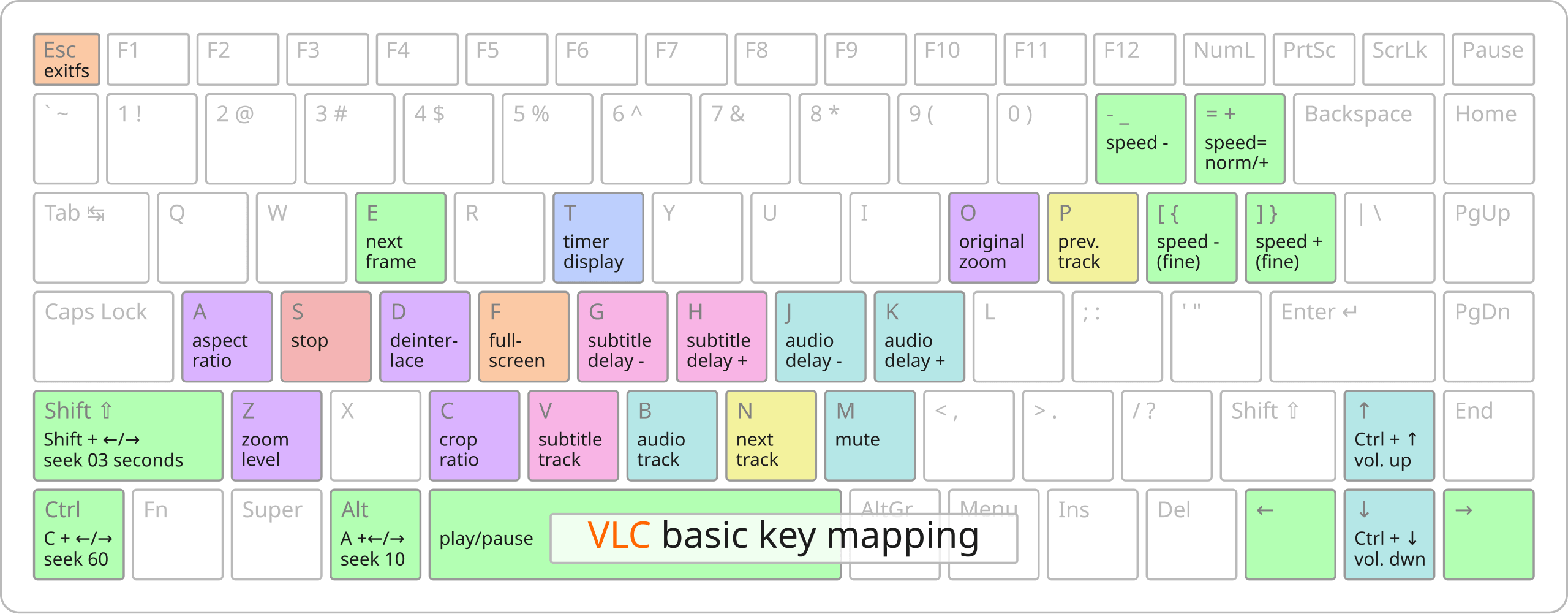
Space - Play/Pause. S - Stop. F - Fullscreen toggle. T - Show time/position. Shift+Left/Right - Seek 3 seconds. Alt+Left/Right - Seek 10 seconds.
M - Mute. Ctrl+Up/Down - Volume up/down. B - Next audio track. J/K - Audio delay decrease/increase. Use the equalizer with Ctrl+E.
A - Aspect ratio. C - Crop ratio. Z - Zoom. D - Deinterlace. O - Original size. E - Next frame (when paused).
V - Cycle subtitle tracks. G - Subtitle delay decrease. H - Subtitle delay increase. Load external subtitles via the Subtitle menu.
VLC is lightweight and runs on a wide range of hardware. Here are the minimum specifications.
OS: Windows 7, 8, 10, or 11 (32-bit or 64-bit)
CPU: Any x86 or x86-64 processor (Intel or AMD)
RAM: 256 MB minimum, 512 MB recommended
Disk: ~120 MB for installation
GPU: Any. Hardware decoding requires DirectX 9+ compatible GPU
OS: macOS 10.12 Sierra or later
CPU: Intel 64-bit or Apple Silicon (M1/M2/M3)
RAM: 512 MB minimum, 1 GB recommended
Disk: ~150 MB for installation
GPU: Any. VideoToolbox used for hardware decoding
Find more help through the official VideoLAN community resources.
The official VLC wiki contains detailed guides, tutorials, and documentation covering every aspect of VLC media player.
Visit WikiAsk questions, share tips, and connect with other VLC users in the official VideoLAN community forum.
Visit ForumFound a bug? Report it on the official VLC bug tracker to help improve the software for everyone.
Report BugSubscribe to VLC mailing lists for announcements, development updates, and community discussions.
View ListsStay up to date with the latest features, bug fixes, and security updates. Download VLC 3.0.23 now.

 English
 Arabic
 Chinese
 French
 German
 Hindi
Hindi Japanese
 Korean
 Portuguese
 Russian
 Spanish
 Thai
Thai Turkish